
Why sorting and searching algorithms are not enough
Why sorting and searching algorithms are not enough
When we teach algorithms, it’s easy to default to the classics: bubble sort, binary search and merge sort. Useful, yes. Memorable for pupils, not always.
If pupils only ever meet algorithms as sorting and searching exercises, they can come away thinking algorithms are just set pieces to memorise.
In reality, algorithms are decision-making frameworks. They help us break problems down, model what matters, work within constraints like time and memory and justify why one approach is better than another. Real-world algorithms make those habits of thinking visible.
Here are six real-world algorithms that show up in everyday systems: from route planning and packing luggage to saving computing time with memory. Below is a brief introduction to each one, how they work and where you’ll spot them outside the classroom.
1) The greedy algorithm
A greedy algorithm tries to reach a goal by repeatedly making the best-looking choice at each step. It doesn’t look ahead or compare lots of possibilities. It just keeps choosing what seems best, right now.
Greedy approaches often feel fast and sensible because they reduce decision-making to one clear rule.
A classroom-friendly way to explain it
I frame greedy algorithms as a “next best step” strategy.
Local choice: the decision you make right now using only the information in front of you
Global goal: what you are trying to achieve overall by the end
A greedy algorithm keeps making local choices and hopes those choices add up to a decent overall result.
A simple starter discussion
Start with a quick scenario pupils can argue about.
You have 12 minutes to get to school.
Route 1 is usually fast but sometimes has roadworks
Route 2 is always steady but slightly longer
Ask:
Which route would you pick and what rule are you using?
When might that rule let you down?
This sets up the key idea: greedy rules are quick but they can push you into a worse overall outcome.
Learning about the greedy algorithm by giving change
A greedy algorithm for giving change works by repeating one simple decision until there’s nothing left to pay.
How it works:
Start with the total change you need to give.
Look at the available coins from largest to smallest.
Take the largest coin that does not go over the amount left.
Subtract that coin from the amount left.
Repeat until the amount left is 0.
It’s “greedy” because at every step it grabs the biggest coin it can right now without checking whether that choice will cause problems later.

Let’s say you need to make 67p using the above coins.
Amount left: 67p
Largest coin that fits is 50p. Take 50p. Amount left: 17pAmount left: 17p
20p is too big so take 10p. Amount left: 7pAmount left: 7p
Take 5p. Amount left: 2pAmount left: 2p
Take 2p. Amount left: 0p
So the greedy solution is: 50p + 10p + 5p + 2p.
This works so well in class because pupils can trace it by hand before they see any code.
It feels logical
It is easy to follow step-by-step
It makes the rule visible, which is half the battle with algorithms
See the algorithm working in Python
Seeing the greedy algorithm in Python helps pupils connect the rule to real code. It’s not a brand new programming challenge, it’s a recap of familiar building blocks used for a clear purpose.
Pupils open GreedyAlgorithm.py and read a short subprogram that loops through a coin list.
It makes the algorithm feel less abstract because pupils can run it, change the inputs and immediately see what happens. Pupils see that an algorithm is a repeatable decision-making process, not just a definition to memorise.
What they are really learning is:
a list can store the available options in order
a for loop can try each option
a while loop can repeat an action until it no longer fits
the algorithm is greedy because it always tries the biggest coin first
A nice extension is to introduce a new coin, like 25p and ask why the program breaks if the coin list is not in the right order. Pupils quickly spot that greedy depends on the rule and the rule depends on the list order.
The greedy algorithm is quick, not perfect
Greedy can give a correct answer quickly but it is not guaranteed to give the best overall answer.
A simple way to phrase it for pupils is:
Greedy is good for speed. It is not always good for best.
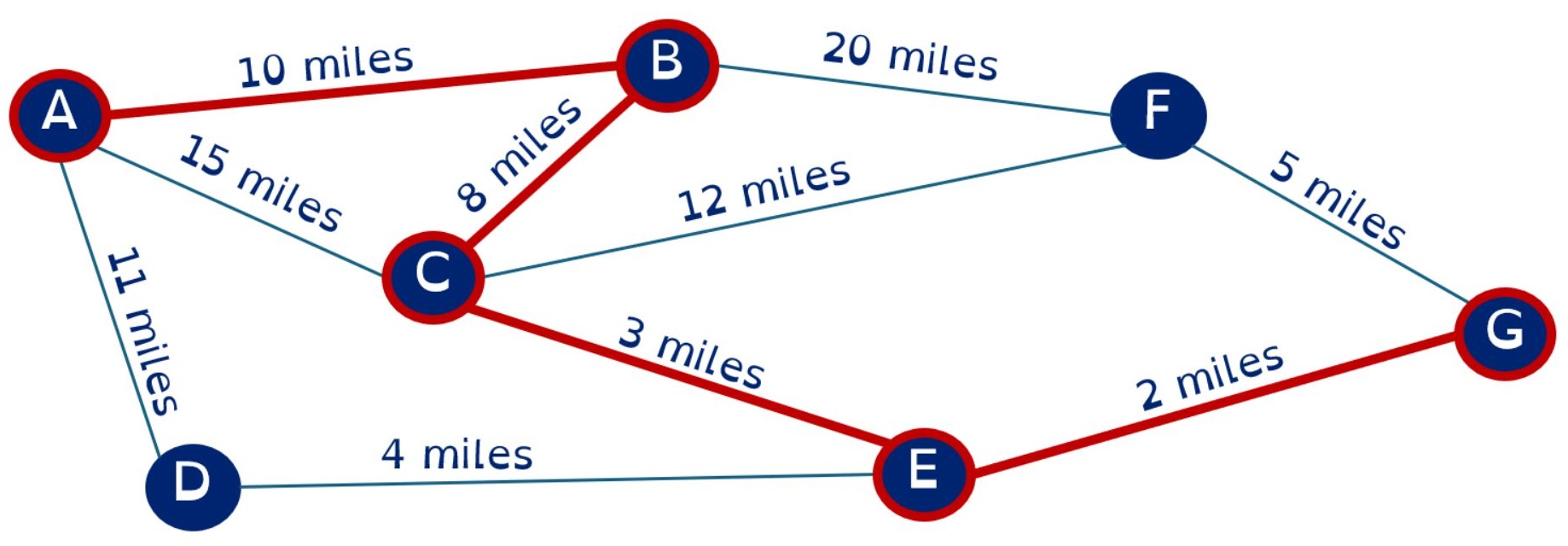
You can reinforce this with a journey planner example where choosing the shortest next step leads to a longer total route.
Where greedy shows up in real life
Giving change and cash handling
Scheduling choices when you always do the next thing that seems most urgent
You can even ask pupils to invent their own greedy rule from everyday life then explain the local choice and the global goal.
Want the free greedy lesson
If you want to teach greedy algorithms in a way that feels practical and accessible, you can download my Greedy algorithm lesson for free.
It includes:
Fully editable classroom-ready slides and lesson plan
a worked example pupils can trace by hand
a short Python program that makes the greedy rule visible
an extension task that helps pupils see how list order affects the outcome
Download your free lesson here
2) The knapsack problem
The knapsack problem models decisions where you have a strict limit, like weight, space, time or budget. You are trying to choose a set of items that fits within that constraint while maximising value.
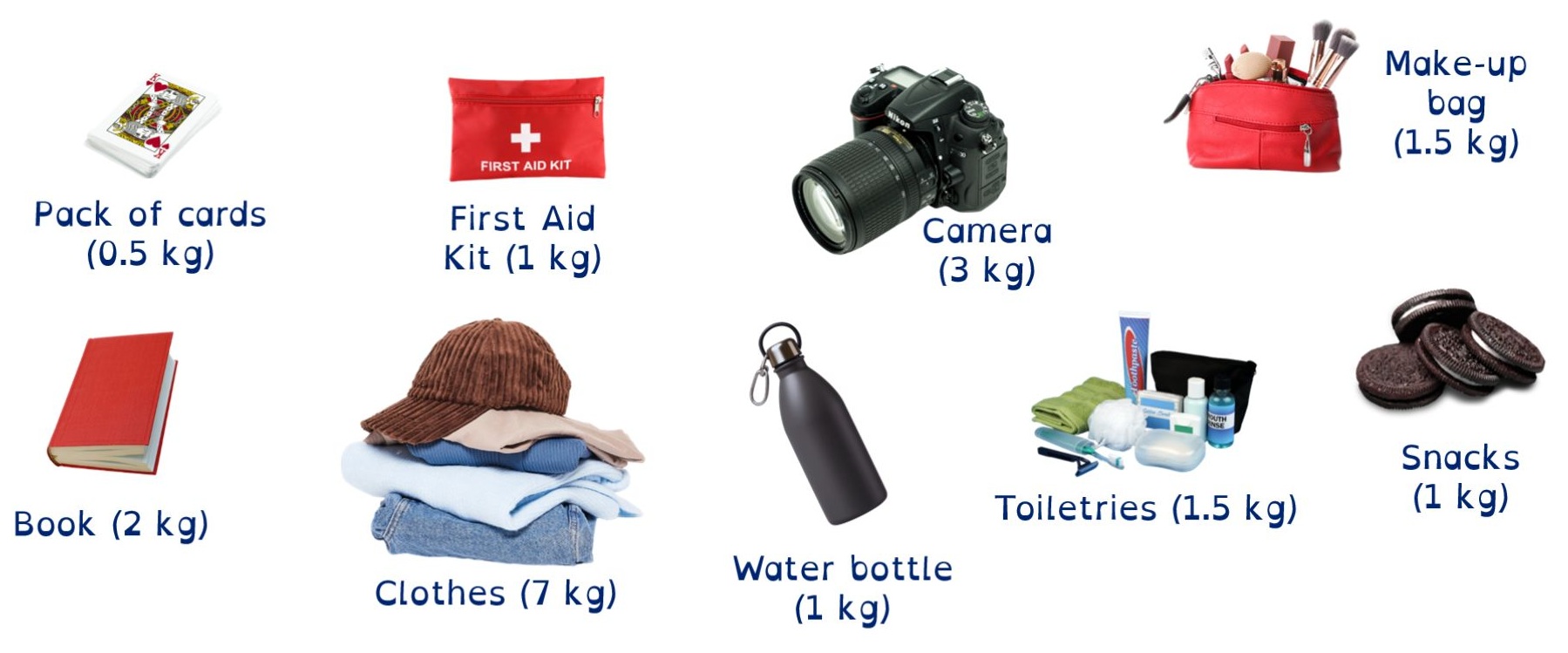
In the luggage and logistics context, the constraint is a weight limit and the goal is to pack the most useful combination.
Where you see it in real life
Cargo shipping and delivery vans: weight and space limits vs profit
Investing: limited budget vs best return
Project planning: limited time and people vs biggest impact
What pupils learn
Pupils quickly see that different rules give different outcomes. Choosing lightest-first might fit more items but still give a low total value. Adding an importance value makes the trade-offs clearer and introduces the idea of optimisation.
3) Cache and memoization (smart choices with memory)
Memoization is when a program stores answers it has already calculated so it can reuse them later. Instead of repeating the same work, it checks a cache first.
This is especially useful when a problem contains repeated steps or repeated sub-questions.
Where you see it in real life
Apps and websites caching results to load faster
Games storing previously computed states
Any program that repeatedly calls the same function with the same inputs
A simple way to explain it
If you have already worked out the answer once, why waste time doing it again.
4) Directed acyclic graphs (ordering dependent tasks)
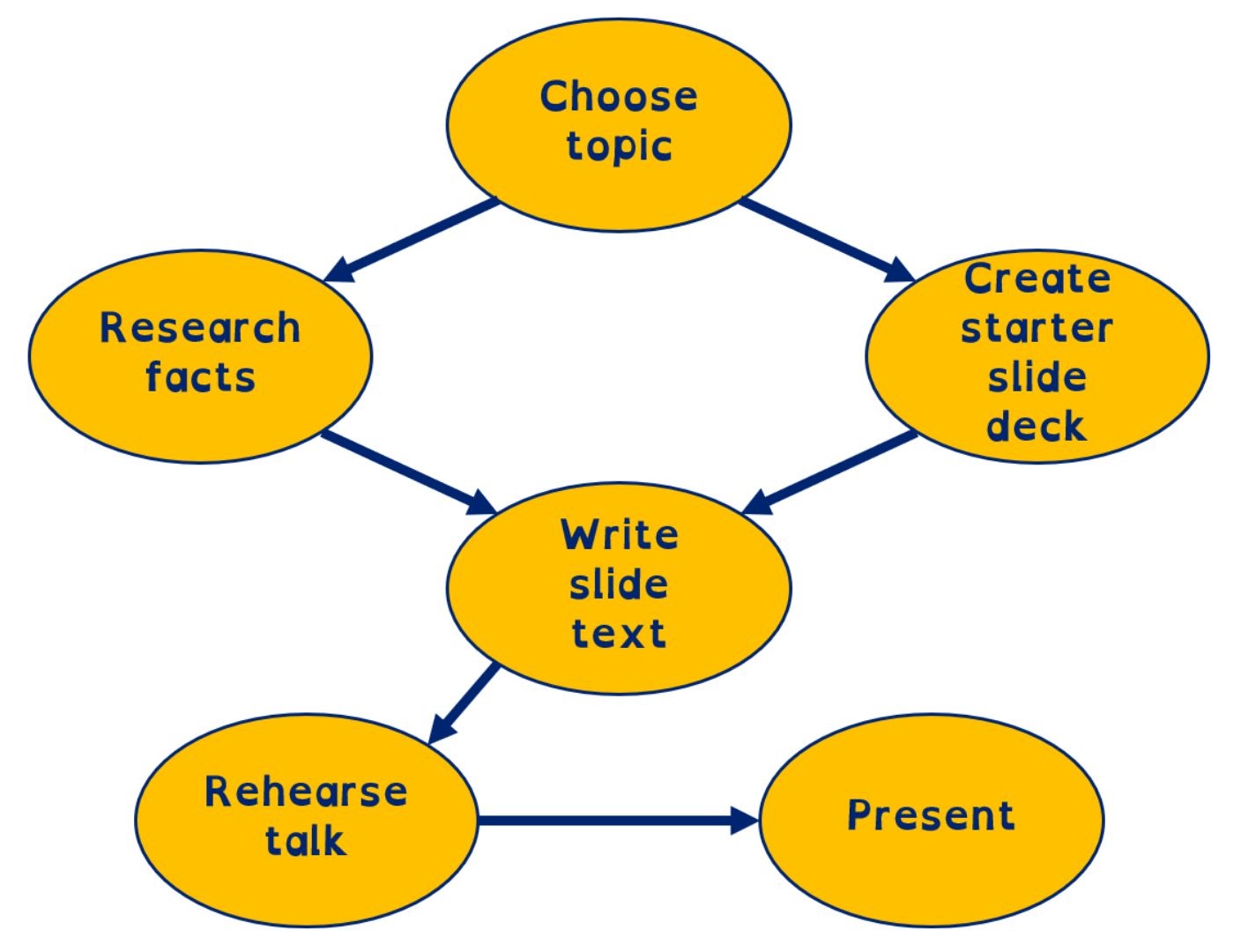
A Directed Acyclic Graph, or DAG, is a way to map tasks with arrows that show prerequisites.
Directed means the arrows have a direction, from the prerequisite to the task it unlocks
Acyclic means there are no loops. If you can follow arrows and end up back where you started, the plan is broken
In other words, a DAG helps you spot what is ready to start and what is blocked.
Where you see it in real life
Software builds: you cannot compile before you write code
Project planning: some tasks can happen in parallel, others cannot
Campaign planning: creative, approvals and scheduling often have dependencies
5) Virality and replication (exponential growth)
Exponential growth is when a total increases by multiplying by the same factor each step.
That is why a small number of computational steps can create a huge output.
In the lesson, pupils compare linear growth (add 1 each step) with exponential growth (double each step) and see how quickly doubling wins.
Where you see it in real life
Viral spread in networks when people share content from person to person
Backups and replication where data is copied to multiple places for reliability
CDNs that copy video files across many servers so streaming stays smooth when loads of people watch at once
6) The Monte Carlo method (random sampling to estimate)
The Monte Carlo method solves hard problems by running lots of random trials and using the overall pattern to make an estimate.
In the lesson, pupils generate random X and Y coordinates and estimate the area of a target zone using a hit ratio.
Hits are points that land inside the target
Hit ratio is hits divided by total drops
Estimated area is hit ratio multiplied by the total area
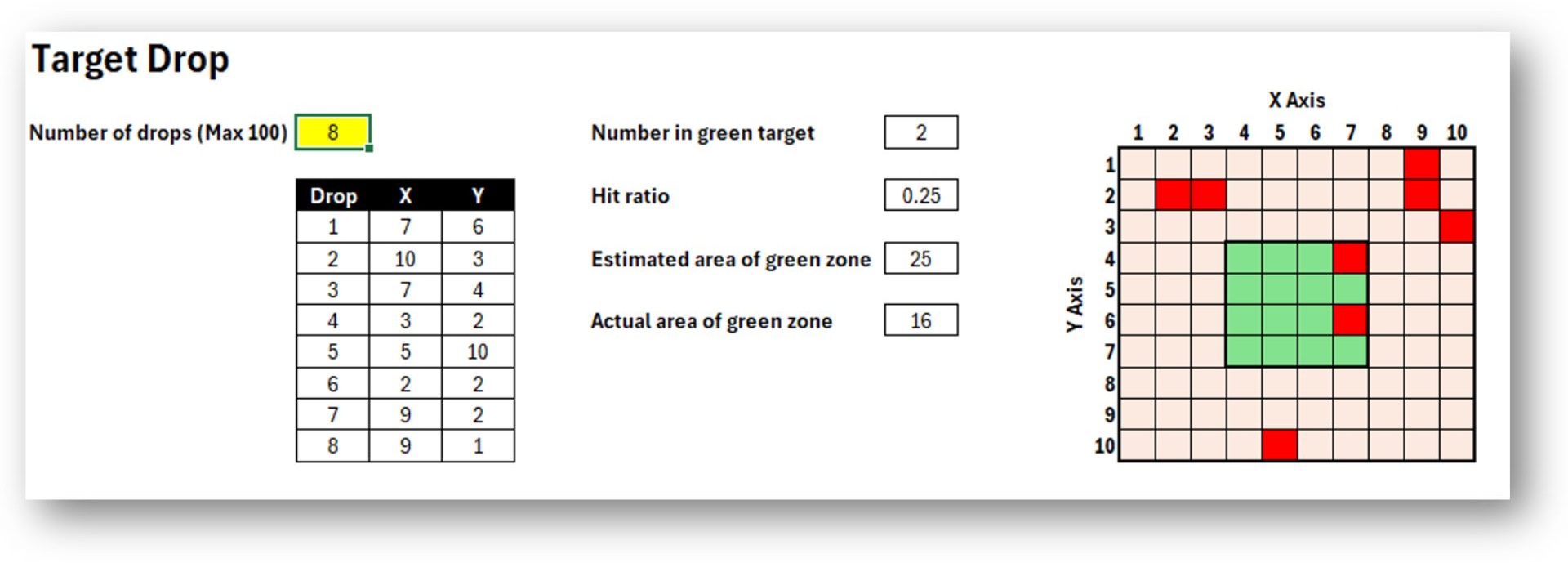
More samples usually makes the estimate more reliable because random results even out with a bigger sample.
Where you see it in real life
Ray tracing in games and film where lots of random rays are averaged to estimate realistic lighting
Weather forecasting ensembles where the model is run many times with slightly different starting values to estimate likelihoods
Why sorting and searching algorithms are not enough
Sorting and searching are great for teaching foundational ideas: comparison, iteration, efficiency and data structures. But if that is all pupils ever see, algorithms can start to feel like artificial puzzles that only exist in computer science classrooms.
Real-world algorithms help pupils build a different kind of understanding.
They connect to constraints pupils recognise: time, money, weight, limited choices
They show that “works” is not the same as “best”: a quick method can be useful but not always ideal
They build decision-making language: constraint, trade-off, value, local choice, global goal
They support technological literacy: pupils start to see algorithms as tools that shape real systems
Most importantly, real-world algorithms help pupils see computer science as a subject that explains the world, not just a subject that prepares them for an exam.
Want the full set of lessons?
I have developed a full 6-lesson unit with classroom-ready slides and Python tasks where everything is fully planned and ready to teach so you can deliver with confidence.
Includes fully editable PowerPoint presentations, lesson plans and worksheets plus supporting Python programs and spreadsheets for the practical tasks.
Lessons included:
The greedy algorithm
Luggage and logistics (knapsack problem)
Smart choices and memory (cache and memoization)
Ordering dependent tasks (DAGs)
Virality and replication (exponential growth)
The Monte Carlo method
Buy it now and save yourself hours of planning.