

Data Visualisation
How to teach data visualisation to Key Stage 3 computing classes
Data is no longer something pupils only meet in spreadsheets or exam questions. It shapes the world around them. They see it in headlines, infographics, social media posts, recommendation systems and the growing number of AI tools that present information as if it is neutral and reliable.

That is why data visualisation deserves far more attention in the new computing curriculum than simply choosing the right chart type.
If pupils are going to live and work in a world increasingly shaped by data and AI, they need to be able to do more than present information neatly. They need to understand how data is collected, how it can be distorted by errors or bias and how visualisations can clarify facts or even mislead people if used wrongly. Students also need to know how to question what they are looking at, how to interpret it carefully and how to decide whether its trustworthy.
For me, that is what makes teaching data visualisation so valuable.
Done well, it is not just a spreadsheet skill, its part of teaching digital literacy, critical thinking and responsible decision making in a world where data will influence more and more of the choices our pupils make.
Why data visualisation matters in the classroom
One of the things I think makes data visualisation so valuable for key stage 3 computing lessons, is that it sits at the point where technical skill meets judgement.
Pupils are not just learning how to put information into a graph. They are learning to notice what the data is really saying, what might be missing and how small choices can change the message completely. A misleading scale, a poor graph choice or a biased sample can all lead to conclusions that sound convincing but are not actually reliable.
That is what makes data visualisation such an important topic to teach well. It gives pupils the chance to work with data in a practical way while also developing the kind of critical thinking they'll need far beyond the computing classroom. They're learning to question information, not just present it.
In a time when AI tools can generate charts, summaries and infographics in seconds, that ability to pause, check and interpret what is being presented to them, matters more than ever.
Start with data that feels real
One of the easiest ways to make a data visualisation lesson more meaningful is to use data pupils have helped create.
A simple class survey works really well. You don’t need anything complicated. In fact, the more ordinary the starting point, the better.
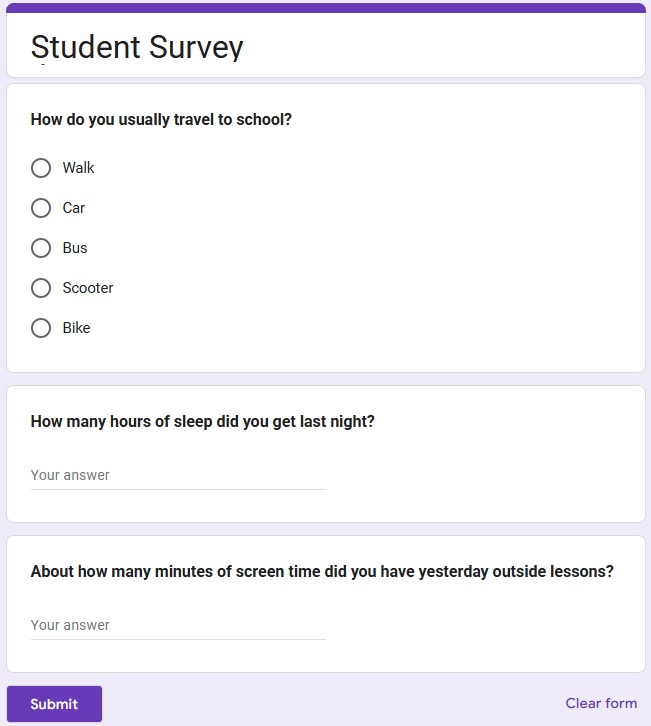
You could ask pupils to create a short survey around questions like:
How do pupils travel to school?
How many hours of sleep did pupils get last night?
Which revision strategies do pupils find most helpful?
How much screen time do pupils think they have each day?
Straight away, you have something useful to discuss.
Is the question clear?
Will everyone interpret it in the same way?
Are pupils likely to answer honestly?
Is the sample big enough to support a claim?
This helps pupils see that data does not just appear but rather data is collected and shaped by the choices people make.
Practical activity for the classroom: Spot the problem
Before pupils create their own graphs, give them a small messy dataset and ask them to act like data detectives.
Include things like:
missing values
impossible ages or times
inconsistent spellings
obvious outliers
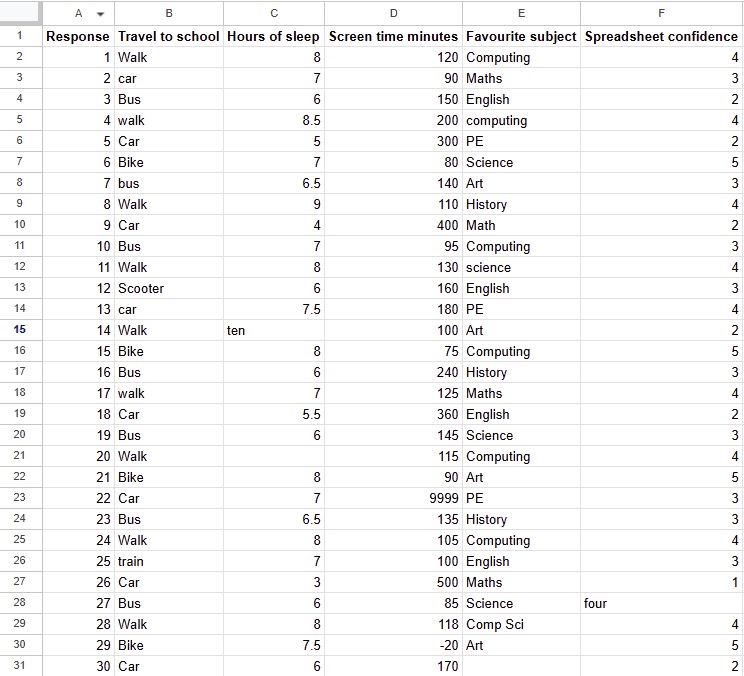
Ask pupils:
What looks wrong?
What might have caused the problem?
Should this value be fixed, removed, grouped or checked?
How might this affect the final graph?
This is a really useful way to introduce data cleaning without making it feel too abstract.
Teach graph choice as a decision, not a rule
Choosing a graph is about deciding what you want the audience to notice. A helpful classroom activity is to give pupils the same dataset but presented using different graph types.
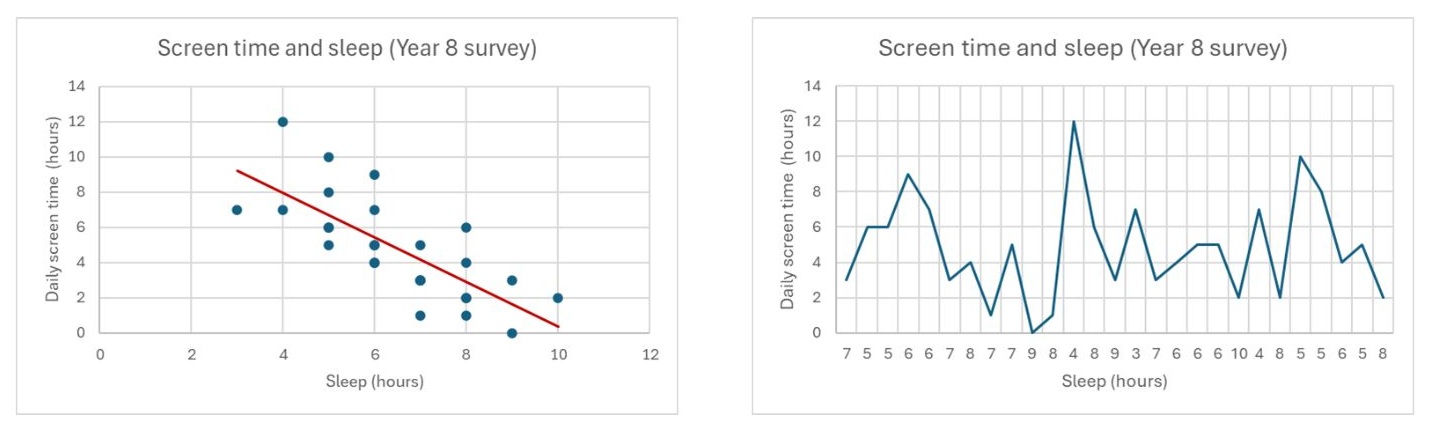
Then ask:
Which version is easiest to understand?
Which version makes comparison clearer?
Which version hides important detail?
Which version could mislead someone if they looked too quickly?
That discussion is often far more valuable than simply naming graph types.
Practical activity for the classroom: Misleading or fair?
This is one of my favourite ways to teach data visualisation because pupils usually have strong opinions about it.
Show pupils a set of graphs and ask them to decide whether each one is fair, misleading or somewhere in between.
You can include examples with:
axes that don't start at zero
uneven intervals
labels that are unclear
graphs that suggest causation when they only show correlation
Then ask pupils to improve one of the graphs so it communicates the data more honestly.
This works well because it moves the lesson beyond making graphs and into questioning them.
Make room for correlation and causation
This is such an important idea but it doesn’t need to be overcomplicated.
Pupils often see two things happening together and assume one must have caused the other. Data visualisation is a great place to challenge that.
Try giving pupils pairs of facts in a single statement like these:
Pupils who revise more get better test scores.
Ice cream sales rise when sun cream sales rise.
A school notices that on days when the canteen sells more pizza, more pupils get detentions.
Ask them:
Does this show a pattern?
Does it prove one thing caused the other?
What else might explain the link?
That kind of discussion builds critical thinking and helps pupils become more cautious when interpreting charts and claims.

Use AI carefully, but use it well
If you have access to a tool like NotebookLM, it can be a really interesting addition to a data visualisation unit.
For example, pupils can generate an infographic from a cleaned dataset and then compare the output against the original spreadsheet.
That gives you a brilliant opportunity to ask:
Is the infographic accurate?
Has anything been simplified too much?
Has the AI chosen the best way to present the data?
Would a reader come away with the right impression?
I like this approach because it keeps the focus on judgement rather than novelty. The tool is not doing the thinking for pupils. It is giving them something to evaluate.
Link data visualisation to digital literacy
One of the reasons I think teaching data visualisation is so worthwhile is that it connects so naturally to wider digital literacy.
Pupils are growing up surrounded by dashboards, infographics, recommendation systems and AI-generated content. They need to understand that if the original data is weak, biased or messy, the conclusions will probably be weak too.
A useful final activity is to ask pupils to connect a small classroom survey to a bigger real-world system.
For example:
How is a class survey similar to data collected by a music app?
What happens if the training data for an AI tool is incomplete or biased?
Why might a recommendation system get things wrong?
This helps pupils see that data visualisation is not just a spreadsheet skill. It is part of understanding the digital world they live in.
A simple structure for teaching data visualisation to KS3
If you want a clear route through the topic, this sequence works well:
Start with what data is and where it comes from.
Collect simple survey data.
Spot errors, outliers and invalid entries.
Clean the dataset using clear rules.
Choose graph types and justify the choice.
Evaluate misleading graphs and weak conclusions.
Link the learning to big data, AI and digital literacy.
That gives pupils a full journey from collecting data to interpreting it thoughtfully.
Final thoughts
If I'm honest, I think data visualisation is one of the most useful topics we can teach in KS3 computing.
Not because pupils need to become expert spreadsheet users overnight, but because they need to learn that data is not neutral, graphs are not always truthful and good decisions depend on careful interpretation.
If we can help pupils ask better questions about the data they collect and the graphs they see, we're teaching something that will serve them far beyond the computing classroom.
And if you want a ready-to-teach way to do that, I have created a Year 8 data visualisation unit that takes pupils from surveys and spreadsheets through to misleading graphs, infographics, big data and AI in a practical, manageable sequence.
Frequently asked questions
What is data visualisation in KS3 computing?
Data visualisation in KS3 computing is the process of presenting data in a visual form such as charts, graphs, tables or infographics so pupils can spot patterns, trends and anomalies more easily. In the classroom, it is not just about making data look neat. It is about helping pupils understand where data comes from, how it can be inaccurate or biased and how visual choices can affect interpretation. Teaching data visualisation well also supports digital literacy and critical thinking.
Why is data visualisation important for Key Stage 3 pupils?
Data visualisation is important for Key Stage 3 pupils because they are growing up in a world shaped by data. They see graphs, dashboards, social media statistics and AI-generated summaries all the time. If pupils only learn how to create charts without questioning them, they miss a vital part of the topic. Teaching data visualisation helps pupils learn how to interpret information carefully, spot misleading presentations and make better judgements about what they see online and offline.
How do you teach data visualisation in a KS3 computing lesson?
A good way to teach data visualisation in a KS3 computing lesson is to start with data that feels real and relevant. Class surveys work well because pupils can collect the data themselves and then explore issues such as unclear questions, missing values and biased samples. From there, pupils can clean the dataset, choose suitable graph types and discuss how different visualisations change the message. Lessons become even more meaningful when pupils evaluate misleading graphs and connect their learning to digital literacy, big data and AI.
What should pupils learn about misleading graphs and bias in data?
Pupils should learn that graphs and charts are not always neutral. A visualisation can be misleading because of truncated axes, uneven intervals, unclear labels, selective data or poor graph choice. They should also understand that bias can begin before a graph is even created, for example through weak survey questions, small sample sizes or incomplete data collection. Teaching this helps pupils move beyond simply creating graphs and towards interpreting data with more care, confidence and scepticism.

